How to build a service business website with AI
Turn your services, project photos and customer questions into a website that brings in useful enquiries. Plan, build and launch with the Voltway template.


Step 1: Decide which customers and jobs the website should bring you
A service business website helps someone decide whether to call you. A prospective customer wants to know what work you do, whether you cover their area and what happens after they get in touch. Answer those questions clearly, then give them a straightforward way to ask about their job.
The examples in this guide focus on electricians and other businesses working in customers' homes. Start with the questions people ask, photographs of completed jobs and the details you need before preparing a quote. You can then use AI to turn that material into a website, beginning with the Voltway Services template.
Choose the work you want more of
Write down your main services and the people who buy them. An electrician fitting lighting in occupied homes needs a different introduction from a contractor maintaining commercial premises. Both may offer excellent work; the customer is looking for different evidence.
Be specific about the area you serve, the size of job you accept and any work you do not take on. If emergency callouts are not part of your service, avoid a headline that implies someone will answer at any hour.
Try a simple description: “We plan and install lighting for homeowners renovating kitchens and living spaces in [your service area].” It gives you a starting point for the homepage and makes it easier to recognise enquiries that fit.
Collect the facts in one place
Prepare your business name, contact details, working hours, service area and a short description of each service. Add your own photographs, relevant qualifications, customer comments you have permission to publish and notes on how pricing works.
Keep a list of questions from recent conversations. “Do I need to buy the fittings first?” and “Can the room stay in use during the work?” are good candidates for a service page. They will usually help a customer more than another paragraph promising exceptional quality.
Step 2: Choose your template, name and website address
Choose a website platform around the work you need to do after launch. You should be able to update a service, replace a photograph, change your contact details and publish the result without rebuilding the site from the beginning. Include the website plan, domain renewal and any email or booking services in your budget.
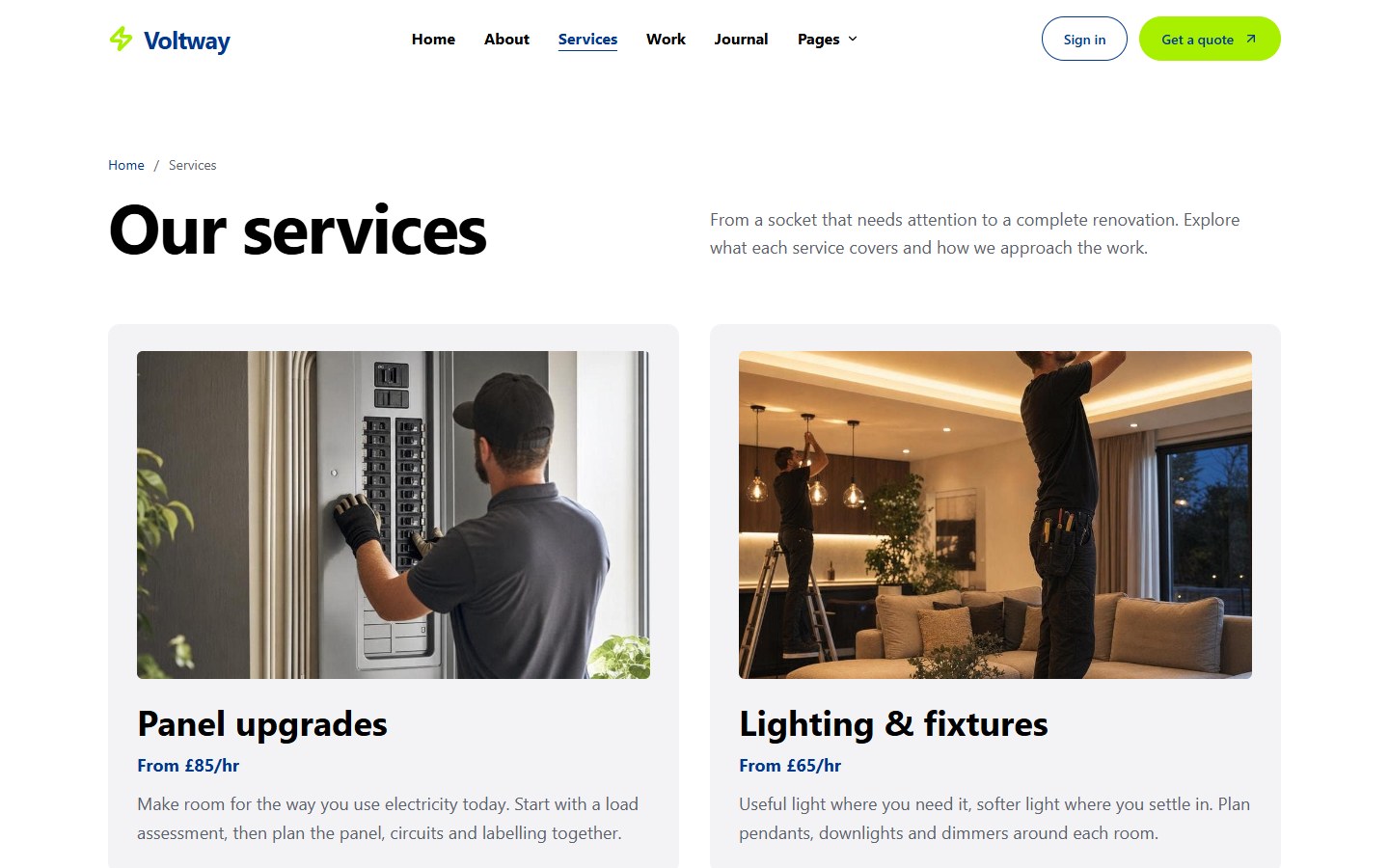
In Mythos, you can start with a template and describe your changes through chat. Voltway Services provides a blue and lime design with service and project pages, an About page, pricing and a quote calculator. It also includes customer accounts and an administration area for enquiries, articles and vacancies.
Review the template as a customer
Open the preview on your phone. Choose a service, read its details and find the enquiry form. Look for a structure that suits the way people buy your work, then decide which parts you need. A small team can launch with services, projects, About and Contact; a careers page can wait until there is a real vacancy.
Use Create your own on the template page to start your project. Give Mythos the brief and photographs you collected. A useful first request might be:
“Adapt Voltway for our residential electrical business in [area]. Focus on lighting installation, rewiring and electrical inspections. Use the attached service descriptions, project photos and contact details. Keep the current colours and layout, replace the sample business information and remove Careers for now.”
Read the first version before requesting more changes. Correct one page or section at a time so you can see whether the result matches the business.
Pick an address people can remember
Start with the business name customers already know. Check that the domain is available and easy to say over the phone. A familiar spelling is more useful than a clever variation that needs explaining.
You can review the site at its published address before connecting your own domain. Use one main address on your business profiles, printed materials and email signature once the site is ready.
Step 3: Write pages that answer the questions before the first call
A visitor may reach a service page from search without seeing your homepage. Each page should explain the job, who it is for and how to take the next step.
Make the homepage specific
Use the opening headline to say what you do and where you work. Follow it with a short explanation of the jobs you take on and one clear action, such as “Request a quote” or “Discuss your project.” Choose wording that matches what will actually happen.
Keep the most useful information close to the top: main services, coverage and a way to contact you. Place project examples, an introduction to the team and answers to common questions further down. Someone returning just to find your telephone number should not have to read the whole page.
Give each main service enough detail
Describe what is normally included, what you need to assess and anything the customer must arrange separately. For a kitchen lighting job, that might mean discussing the room plan, fittings, access and the order of work with other trades.
Explain the process in ordinary language: an initial conversation, an assessment if needed, a written quote, the work and the handover. If a step varies by job, say so. A customer should understand what they are agreeing to before pressing the enquiry button.
Use the terms customers use when asking for help. Technical detail belongs where it answers a question or explains a decision. Read the copy aloud; replace sentences you would never say in a conversation.
Help people choose between services
Link related pages where the connection is useful. Someone planning a renovation may need both rewiring and lighting advice. Explain that relationship briefly and give them a route to the relevant page.
Keep the contact action visible at the end of each service description. Carry the service name into the conversation where possible, so the customer does not have to start again.
Step 4: Show the people and work behind the business
A few well-explained projects can make the business easier to judge. Choose examples that resemble the jobs you want to receive, and tell readers what they are looking at.
Turn photographs into useful project stories
For each project, describe the customer's problem, the work you completed and a decision that mattered. “We added task lighting above the worktop and kept the existing ceiling fittings” tells the reader more than “Another stunning transformation.”
Use photographs you own or have permission to publish. Check for house numbers, paperwork and other details the customer may not want shown. A clear photograph of an ordinary job can be more convincing than an impressive image with no connection to your work.
Introduce the team accurately
On the About page, explain who runs the business, who customers will speak to and how you approach the work. Mention relevant experience and qualifications with enough detail to make them meaningful.
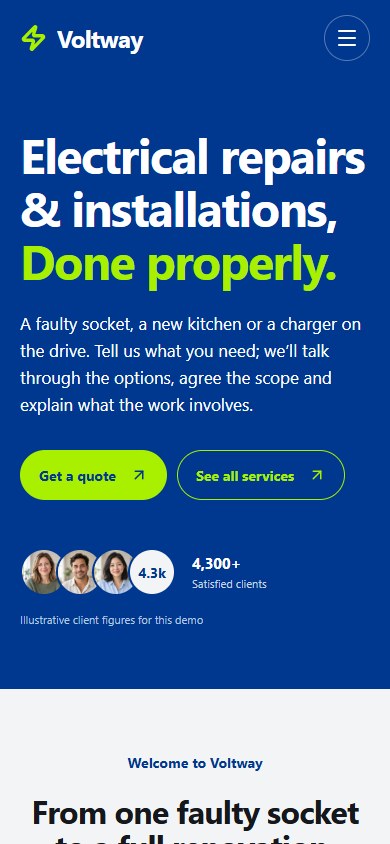
Replace Voltway's demonstration portraits, reviews, projects and figures before launch. Its generated people are examples, not your staff or customers. If you do not yet have material for a section, remove it until you do.
For reviews, use the customer's own words with permission and enough context to be useful. A comment about punctuality, communication or leaving a room tidy helps a prospective customer imagine the experience. Keep a link to your established review profile if you have one.
Step 5: Explain prices and estimates before asking for an enquiry
People often hesitate to make contact when they cannot tell how pricing works. You do not need a fixed price for every possible job, but you can explain what determines the cost and when the customer will receive a quote.
Choose a pricing format that fits the work
A defined maintenance visit may suit a fixed package with clear inclusions. A renovation is more likely to need an assessment and a written quotation. If you display a starting price, describe the job it covers and what can change it.
Make the currency, tax treatment, materials and any separate visit charge clear. Keep these details consistent wherever a price appears. If a customer must speak to you before the cost can be estimated, explain what information they should have ready.
Use the calculator to start a useful conversation
Voltway includes a quote calculator. Replace its sample rates and options with ones that reflect your services, and check the result against several jobs you understand well. Review the saved enquiry too, so the office receives the same estimate the customer saw.
Explain the assumptions beside the result. Access, the condition of an existing installation or a change in materials may affect the final quote. The calculator should help a customer describe the job; it should not promise a final price where you still need to inspect the work.
An estimate request is also different from a confirmed appointment. Use a confirmation message that says what happens next and gives a response time your team can maintain.
Step 6: Set up a contact process you can keep up with
The enquiry form is part of your working day. Decide who reads new requests, what information they need and how the customer receives a reply before announcing the website.
Ask enough to begin
For a first enquiry, a name, contact method, general location and description of the job may be sufficient. Avoid asking for a long technical specification before someone has spoken to you.
Offer a telephone or email route as well as the form. Make those links usable on a phone, and show the hours when someone is available. If you prefer email for non-urgent work, explain that where the customer chooses how to contact you.
Connect enquiries and customer accounts
Voltway includes forms, customer accounts and an administration area. To receive and store real enquiries, connect your own Supabase project and complete the setup described with the template. Until then, treat the preview as a demonstration.
Customers with accounts can review their requests and saved replies. Your team can manage the enquiries from the administration area. Decide whether this is useful for your business and introduce it clearly; someone making a first enquiry should know whether an account is needed.
Email delivery needs its own setup. A saved request or reply does not by itself mean an email has been sent. Test the route you intend to use, including replies to people who enquire without an account.
Try one complete enquiry
Send a test from a phone using an address you control. Check the confirmation, find the request where the team will handle it and send a reply. Then read it from the customer's side.
Agree who checks the inbox or administration area and what happens during holidays. A short, reliable routine is more valuable than several contact channels nobody consistently watches.
Step 7: Help nearby customers find the website
Search visibility starts with pages that describe your actual services and coverage. Use a clear title for each page, a short description of its contents and headings that help a reader find the answer they need.
Write for the job and the place
“Kitchen lighting installation in [your area]” can make sense when the page genuinely describes that service and location. Add useful local details where they affect the work, such as the types of properties you regularly visit or the limits of your service area.
Avoid producing near-identical pages for every neighbouring town. A project story from a place you actually work can provide stronger material: the customer's brief, your approach and photographs of the result.
Google's SEO Starter Guide is a useful reference for readable content, descriptive links and helping search engines understand a site. There is no heading formula that guarantees a position in search.
Keep your business profile accurate
If your business is eligible for a Google Business Profile, keep its services, contact details and hours current, and link to the website you use. Add relevant photographs and respond to customer reviews.
Google describes local results in terms of relevance, distance and prominence. Accurate information helps people assess whether the business fits their needs; it does not remove the effect of location or guarantee a particular ranking.
Check the published address
Voltway includes page titles, descriptions, sharing images and a sitemap for public pages. Configure your final website address and enable indexing when your own content is ready. The template demonstration keeps indexing off.
Use Google Search Console for your own domain to check important pages and submit the sitemap. Keep customer and administrator pages private. Search submissions are requests for discovery and processing, so review what the tools report instead of assuming that submission means a page is indexed.
Step 8: Review the whole customer journey and publish
Before launch, ask someone unfamiliar with the site to find a service and make an enquiry. Watch where they hesitate. Their questions can reveal unclear wording that you no longer notice after reading the page several times.
Check it on the devices customers use
Start on a phone, then use a tablet or larger screen. Read your real headlines and service names, open the menu, use the calculator and complete the form. Check that buttons remain easy to reach and that error messages explain what to correct.
Try the same journey with a keyboard and larger text. Compress replacement photographs for the size at which they appear, and keep the subject visible when the image crops on a small screen.
Finish the business details
Check telephone numbers, email addresses, social links, opening hours and the area you serve. Review the privacy notice for the information you collect and the services that handle it. Use terms appropriate to the way your business works, with professional advice where needed.
Publish the reviewed site and repeat the enquiry at the public address. Open a service page directly and refresh it, rather than checking only links from the homepage. If you use accounts, check registration, sign-in and password recovery at that address too.
For a client project, make sure the owner has access to the website, domain and enquiry system. Show the person responsible how to update business information and publish a change. Leave them with a working routine for the next request.
Step 9: Bring people to the site and learn from their enquiries
Add the website to your business profiles, email signature and the places customers already find you. When someone recommends your work, give them a service or project page that explains the relevant job.
Publish answers drawn from your work
Use recurring customer questions as article ideas. A guide to preparing a room for a visit, choosing fittings or reading a quote can help people before they contact you. Have the responsible specialist check technical advice and keep it within the work you are qualified to discuss.
You do not need a frequent publishing schedule to begin. One useful article based on real experience is a better starting point than a batch of broad introductions. Link it from the service page where a reader would need it.
Voltway has an editor for articles and vacancies. After updating published content, rebuild and Publish the site so the public pages and sitemap reflect the changes. Remove filled vacancies and review articles when your services or advice change.
Measure the enquiries you want to receive
Ask new customers how they found you and which page helped them. Review whether requests concern the services and area you intended to promote. Visits alone will not tell you whether the site is bringing the right work.
If many people ask the same question before proceeding, answer it more clearly on the relevant page. If enquiries repeatedly fall outside your area or scope, bring those limits closer to the contact action.
Start with the Voltway Services template, a focused business brief and a few good examples of your work. Launch when the pages and contact process are useful, then improve the site with what you learn from actual customers.
Last updated