A green preview is not a release verdict
Why polished generated apps create false confidence—and how to separate visible progress from evidence that a product is ready for real users.


Key takeaways
- A polished Preview is strong evidence about the visible slice of a product and weak evidence about everything outside that slice.
- Mythos checks delivered source with TypeScript and a Vite production build. Browser checks add evidence for the views actually exercised; they do not cover every product promise.
- The risks that decide whether an app is ready usually live beyond the screenshot: identity boundaries, production configuration, failure behavior, data recovery, and ownership.
- Treat Preview as the beginning of confidence, not the end of review.
The Preview is evidence, not a verdict
Green is persuasive because it compresses a complicated process into one reassuring signal. The page loaded, the layout held together, and the interaction you tried appeared to work. That is meaningful progress. It is also a very narrow description of reality.
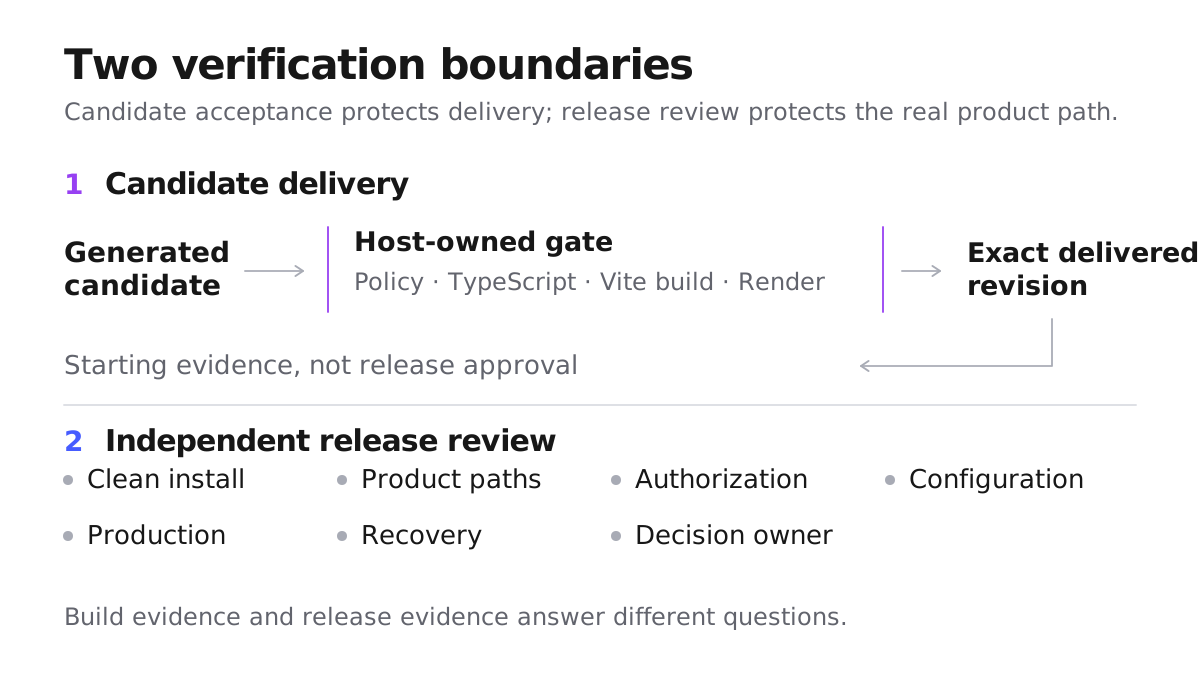
A Mythos delivery has real technical gates. The exact version must pass TypeScript and produce a Vite production build. When browser verification is available, Mythos also checks rendering at desktop and mobile sizes; if that check could not run, those viewports remain unverified. These checks can reject broken source, an invalid production build, and genuine rendering failures in the surfaces they exercise.
What they cannot do is infer every promise your product makes. They do not know whether “private” really means private between two accounts, whether a payment can be repeated safely, whether a deployment has the right configuration, or whether a team can recover lost data. A green Preview should therefore be read as a scoped statement: this exact version passed these exact delivery checks. It should never be expanded into the much larger claim that the product is safe to release.
The most dangerous assumptions sit outside the canvas
The visual surface is only the part of the system that fits inside the frame. A Preview may inherit working environment values, an existing session, seeded data, local routing behavior, and dependency state that a real deployment will not share. None of those assumptions has to appear in the interface.
This is why a polished generated app can create more false confidence than an obviously rough prototype. Roughness invites questions. Polish makes hidden conditions feel settled, even when nobody has named them.
Reproducibility is the counterweight. The important question is not whether the builder can show the app again, but whether the team can reconstruct the same candidate from its owned source and documented configuration without relying on the memory of one workspace session. That is an ownership question as much as an engineering one. The companion release-readiness guide covers the practical clean-checkout process; the editorial point is simpler: if the product exists only inside one prepared environment, the Preview is demonstrating that environment as much as it is demonstrating the product.
Example one: the dashboard that only works for its maker
Imagine a customer dashboard that shows invoices, profile details, and a confident empty state. The maker signs in, opens an invoice, edits a billing address, and sees every expected confirmation. The app looks finished.
Now a second customer signs in and requests the first customer’s invoice identifier directly. If the data boundary does not enforce ownership, the second customer may receive a record the interface never linked to. The visual happy path is unchanged. TypeScript can pass. The Vite build can pass. Every screenshot can still look excellent.
This is not a special weakness of generated software; handwritten products fail at the same boundary. Generated interfaces simply make it easier to reach visual completeness before the invisible guarantee has been challenged.
The lesson is to separate a feature from its promise. “Invoices render” is a feature. “Each customer can access only their own invoices” is a promise. Preview is naturally good at showing the first. Release confidence requires evidence for the second.
Example two: the form that succeeds only in Preview
Consider a lead-capture app whose form completes perfectly in Preview. The production deployment opens with the same typography, spacing, and success animation, but the first real submission never reaches its destination because the deployment is missing the expected API binding. The visual review was honest; it simply answered a different question.
Configuration creates this split often. Vite exposes variables prefixed with VITE_ to browser code by design, so an env file is not automatically a vault. A Supabase project URL and anon key are intended for the browser, with safe access depending on least-privilege grants and correct Row Level Security. A service-role or secret key is different: it can bypass RLS and belongs only in server-side secret storage.
The point is not to turn a blog post into a configuration manual. It is to notice that the app users launch is the app plus its real environment. If a necessary value is missing, wrongly classified, or baked into an old build, the Preview’s polish says nothing about the resulting behavior.
Confidence should widen with consequence
Confidence should widen in proportion to consequence. A static campaign page needs accurate content, working links, usable layouts, and correct published metadata. A newsletter page that accepts an address also needs proof that the subscription reaches its intended destination. An internal approval system adds saved records, role enforcement, and recovery. These are different release decisions even when the pages look equally polished.
A useful release argument connects four kinds of evidence: the exact source can be built, the critical product promise works, important boundaries resist the wrong action, and the team can observe and recover the deployed service. Mythos contributes to the first layer and, when browser checks are available, part of the visible behavior layer. The product team still owns the rest.
This framing also makes review faster. Instead of asking whether every generated line looks familiar, start with the claims whose failure would harm a user or make recovery difficult. Evidence around identity, private data, irreversible actions, external dependencies, and restore behavior is usually worth more than another pass over decorative components.
The goal is not certainty. No release process provides that. The goal is a decision whose confidence comes from relevant evidence rather than from the emotional effect of a finished-looking screen.
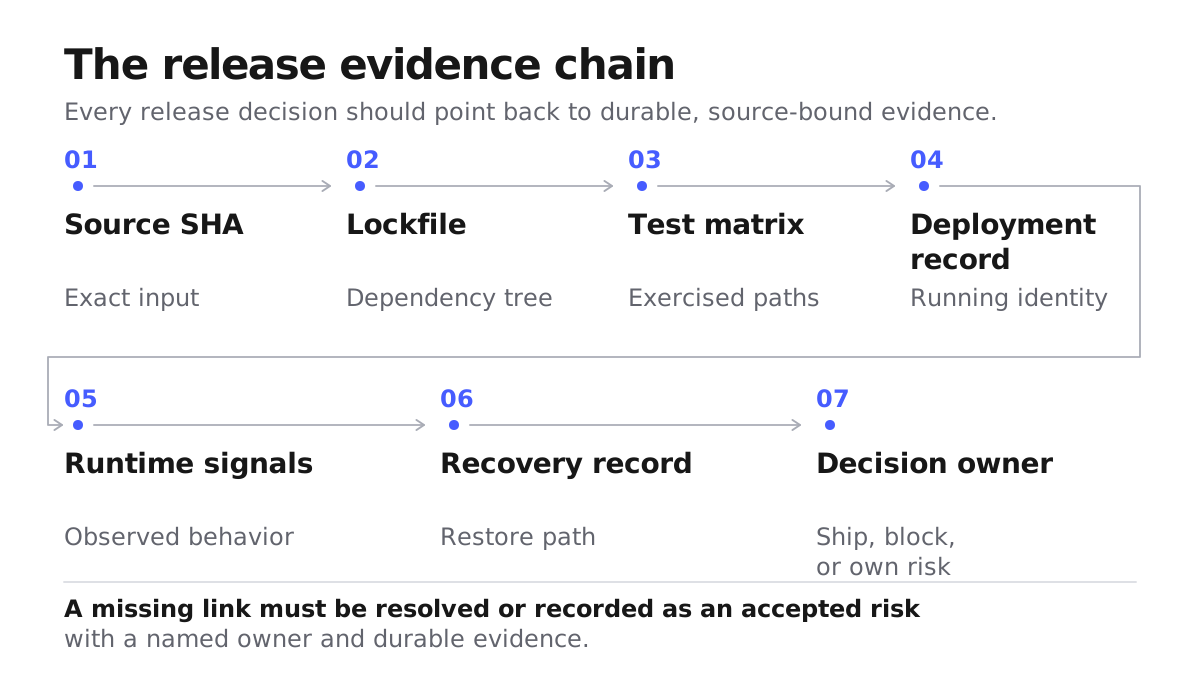
Release is a judgment somebody owns
A green Preview is a system report. “Ship” is a product decision. Confusing the two quietly delegates accountability to an indicator that cannot know your business rules, users, or acceptable risk.
The decision does not need a large release bureaucracy. It needs an exact candidate, a clear statement of what is known, the important unknowns, and a person who owns the consequence. A small low-risk site may need only a brief record. A product handling identity, money, or private data deserves stronger evidence and an explicit reason for any gap that remains.
The practical conclusion is not to distrust generated software. It is to place trust precisely:
- trust required TypeScript and Vite build checks for the technical claims they actually establish;
- trust an available browser check for the views it actually exercised, and mark them unverified when that check could not run;
- trust product, access, configuration, and recovery claims only after evidence reaches those boundaries;
- choose the static-site or data-app path in the release-readiness guide when you need the operational steps.
Preview is valuable because it makes progress visible. It becomes dangerous only when visual confidence is mistaken for release evidence.
Last updated