The hard part of prompt-to-app is knowing what changed
A practical contract for agent interfaces: show the current state, put approval at real decision boundaries, and make failure return control to the user.

Key takeaways
- Separate visible work from the version that is actually saved.
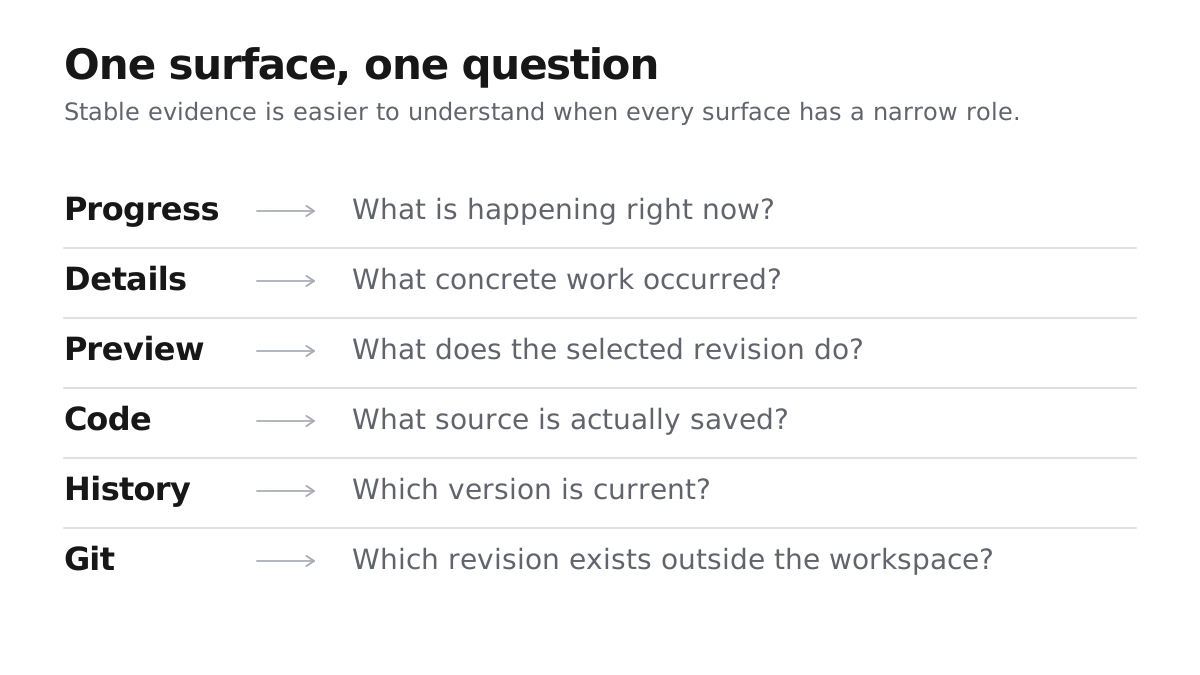
- Give Progress, Details, Preview, Code, History, and Git distinct jobs.
- Ask for approval when an unresolved choice would change the product, not before routine file work.
- Make a new version current only after it passes delivery checks.
- When work fails, keep the last delivered version available and explain the next step.
The confusing moment comes after the first prompt
The user writes one paragraph, waits, and sees a different application. Then the practical questions arrive: is this still working, what did it touch, and am I looking at a saved result or a temporary one?
Those questions describe three different kinds of state:
- operation state: what the agent is doing now;
- product state: what changed in the application;
- decision state: whether the system needs an answer from the user.
The interface has to distinguish those states without exposing a stream of internal tool calls. A useful builder translates agent activity into a small, stable contract the person can learn.
Progress needs an explanation
During a Mythos build, the chat shows the latest file action. After delivery, the completed turn keeps the full changed-file trail under Details. That provides useful evidence without dumping the model's hidden reasoning or a full terminal transcript into the conversation. The workspace switches between preview and code instead of cramming both into one narrow panel.
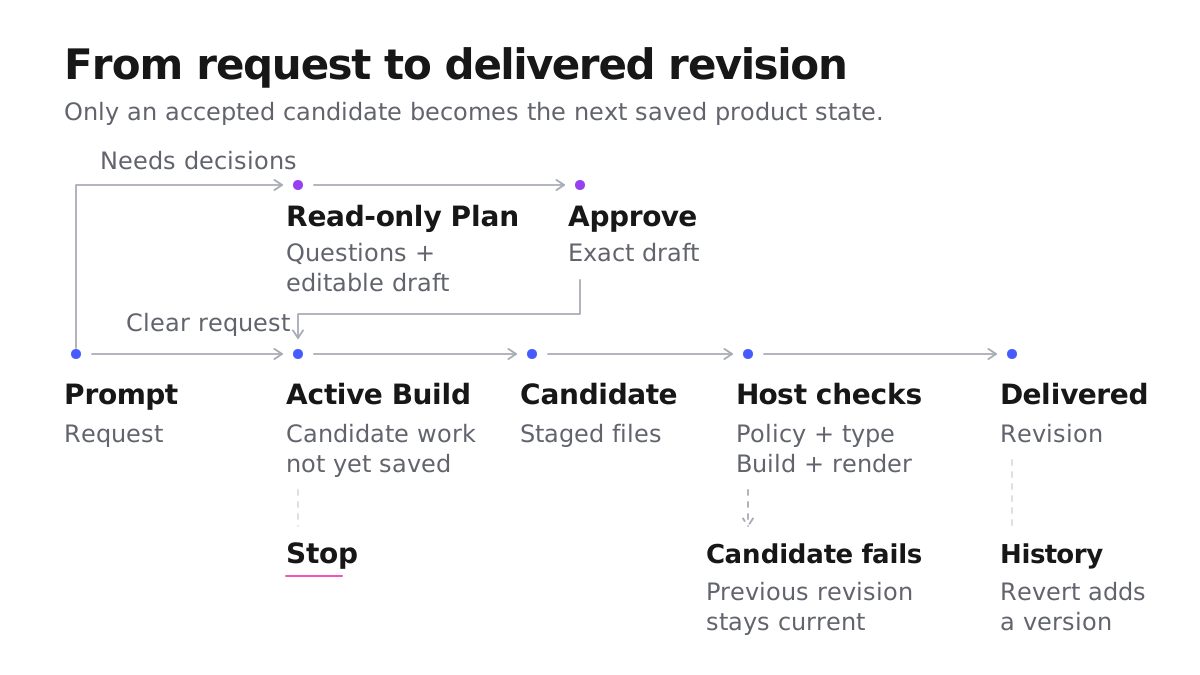
The distinction between working state and saved state matters. Activity can appear while Mythos works, but the current project changes only after the new version passes its checks and is saved. If the work fails, the last delivered version remains the source of truth.
This gives each surface one job:
| Surface | Question it answers |
|---|---|
| Short progress copy | What is happening now? |
| File activity | Which parts of the project are being touched? |
| Preview | Which revision is currently rendered, and which visible flows can I exercise? |
| Code and history | What is actually saved, and how did it change? |
Preview state should expose its Git revision and synchronization status when available. Even then, a working preview is evidence for the flows you exercised, not proof that the application is correct. More detail should be available when it helps investigation; it should not be the price of basic orientation.
Status also has to work when the user is not watching the exact pixel that changed. The W3C guidance for accessible status messages covers progress, success, and errors that assistive technology can announce without moving focus. The Mythos progress card uses a polite live region for stable in-progress status; individual file events remain visible without each one joining the announcement queue.
Put approval at decision boundaries
Asking for approval before every file change sounds safe and quickly becomes unusable. The better boundary is the point where an implementation choice becomes a product choice: visual direction, scope, data ownership, or a promise made to the user's customers.
Mythos exposes two paths. Use Build when you are ready for the app to change. Use Plan when important product decisions are still open: it produces an editable draft without changing project files. Approval sends the exact saved version into a separate Build. The Plan vs Build guide explains the practical choice and credit boundary; the interface's job is to make that choice visible before work starts.
That design follows a broader pattern. Google PAIR's guidance on feedback and control argues for balancing automation with the ability to edit and regain control. OpenAI's practical guide to building agents recommends human intervention when failure thresholds are exceeded or actions are high risk. Approval belongs where a wrong assumption would change the product, not before routine implementation steps.
Be precise about what control means
Control means a person can see which mode is active, what is currently saved, and how to stop work that is still running. Plan remains read-only until approval. Build begins only after a deliberate request or plan approval. While work is active, the Send control becomes Stop. When it ends, one result message explains whether a new version was delivered.
When work stops, the important question is what remains usable. The last delivered source, the attempted change, and any question waiting for the user should stay distinguishable. Test those states in the product instead of judging control from the number of approval dialogs.
Make done and failed mean something
Clicking Build is not the same as receiving a new version. Mythos keeps the current version in place while it checks the new result. Only a successful result becomes current; unfinished work is not quietly delivered.
The terminal status says whether the Build completed, stopped, or could not finish. Preview and History show whether the project changed, while the credit balance records the billing result. Users should not have to infer any of those answers from a dropped connection or a raw service error.
Failure should return control. It should not leave a permanent spinner, an ambiguous half-save, or an error that asks the user to diagnose the platform.
Five questions for a legible builder
You can begin a user-facing audit without seeing the system prompt. Start a build and ask:
- What is the system doing now?
- What has changed so far, and what is only temporary?
- Which version is the current saved source of truth?
- Does the system need an answer from me?
- What happens to the project and the charge if this operation never finishes?
A successful run can answer the first four questions. To test the fifth, use Stop and a controlled failure on a non-production project. Confirm which version remains current, what terminal status appears, and how the credit balance settles. If Preview, History, Git, status, and balance disagree, the user cannot tell whether to wait, retry, or contact support.
Last updated