Own the code. Prove the exit.
Code ownership, source custody, and portability are separate promises. Here is what Mythos keeps, what GitHub receives, what data stays elsewhere, and what survives when the relationship ends.

Key takeaways
- Ownership describes your rights to the work; custody describes where each part lives; portability asks whether the product can continue without the original builder.
- An active paid workspace subscription enables project ZIP downloads, GitHub connection and synchronization, and manual code editing. Ownership of generated code is not conditional on that subscription; see current plan features.
- GitHub synchronization covers one selected branch, runs in the background, and surfaces divergence instead of force-overwriting it.
- Source ownership does not automatically include configuration, secrets, databases, stored files, domains, or authority over external providers.
- Trust depends on the ending as much as the beginning: know what remains yours after disconnecting or deleting the Mythos account.
Ownership, custody, and portability are different promises
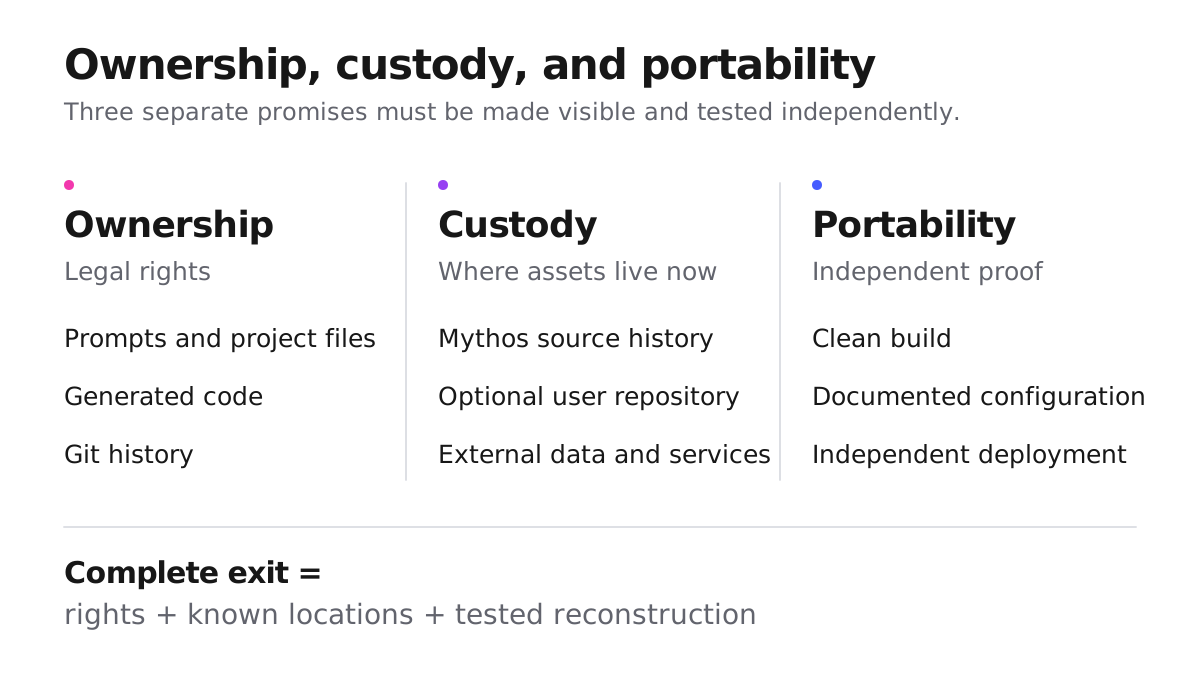
Code ownership sounds binary until the source, data, and operating accounts live in different places. Then three promises have to be evaluated separately:
| Promise | The useful question | What makes it credible |
|---|---|---|
| Ownership | What am I allowed to use, modify, sell, and deploy? | Clear contractual rights and understood third-party obligations |
| Custody | Which account or provider holds each part today? | A named location and responsible owner for source, data, configuration, domains, and credentials |
| Portability | Can the product continue without the original builder? | Source that another team can understand, configure, build, and operate with ordinary tools |
Under the current Terms, the user owns their prompts, project files, generated code, and Git history. That ownership does not require a paid subscription. Mythos keeps the working repository private inside the Mythos GitHub organization. Optional paid features let the user download a project ZIP or connect a new private repository in their selected GitHub account or organization, with two-way synchronization of one selected branch.
Those facts answer only part of the trust question. “You own the code” describes the contractual relationship between the user and Mythos. It does not mean every dependency, asset, font, model output, or imported resource is free of third-party rights. It also does not mean the database, domain, deployment account, or secrets are inside the repository.
Good product language keeps those boundaries visible. Ownership should not be used as shorthand for custody, and custody should not be presented as proof of portability. A trustworthy tool tells users where each important part lives, what the tool can move, and what remains under a separate provider or account.
What the GitHub connection changes
With an active paid workspace subscription and a completed Build, Mythos can create a new private repository in the selected personal GitHub account or organization; it does not attach itself to an arbitrary existing repository. The project’s current files seed one selected branch. While the connection has paid feature access, changes delivered through Mythos are sent to that branch, and compatible commits pushed to the same branch can return to the Mythos project.
Synchronization happens in the background. The Git view reports Connected when both sides are up to date, Syncing while changes are moving, and a conflict or sync error when the user needs to review something. Other branches remain untouched unless the user explicitly selects one.
The connected repository starts with a clean snapshot rather than the earlier internal commit history. This means two repositories can contain the same project files without sharing the same commit hash. For ownership and continuity, the important question is whether the intended source is present and usable—not whether two independent histories happen to use the same identifier.
If the selected branch and Mythos diverge, Mythos surfaces the conflict instead of force-pushing, silently merging, or overwriting either side. Removing the Mythos connection does not delete the repository from the selected GitHub account or organization.
The connection therefore changes source custody: another account now holds a usable copy and can continue to own it after disconnect. It does not transfer the database, provider accounts, domains, secrets, or deployment authority. The practical branch and clean-checkout procedure belongs in the GitHub handoff guide.
Portability is proven outside the original workspace
An export proves that files can leave. Portability asks a harder question: can someone who was not part of the original Build understand those files, supply legitimate configuration, reproduce the application, and take responsibility for what runs?
That test should happen before the project becomes difficult to move. If it waits until a contract ends, an employee leaves, or a provider becomes unavailable, every undocumented assumption turns into time pressure.
The result is not binary. A project may have portable source but still depend on a database that only one person can access. It may build on a clean machine but rely on an undocumented domain, OAuth application, or server secret. It may run on another host while losing the user data that made the service valuable. Each outcome reveals a different custody boundary.
The useful evidence is independence: another maintainer can continue from the connected or downloaded source without access to the original Mythos session, while the team can name which data and external services still require separate authority. This is why portability should be tested as an operating condition, not advertised as a property of a ZIP file.
For the concrete branch, configuration, clean-build, conflict, and continuity procedure, use GitHub handoff for generated apps. The companion essay, A green preview is not a release verdict, explains why visual polish is not release evidence. This article is concerned with a different promise: whether ownership remains useful when the original product relationship ends.
Code sync is not a data export
GitHub synchronization transfers project source, not live backend data. That distinction matters because code and data often have different owners, risks, retention rules, and recovery methods.
If a Mythos project is connected to Supabase, the database, authentication users, and stored files remain in the user’s Supabase account. The frontend may contain browser-safe configuration such as a public project URL and anon key, but server-only credentials stay outside the source and require their own secure access path.
A repository can contain migration files without containing the applied database state. It can describe a table without carrying its records, prove that an authentication screen exists without proving who controls the auth tenant, and reference stored files without exporting the objects themselves. Supabase’s backup documentation also distinguishes database backups from Storage objects: database backups include Storage metadata, not the files stored through the Storage API.
This creates three separate custody records:
- source custody: which repository and branch contain the maintained application;
- data custody: which provider account holds the schema, records, users, and stored objects;
- authority custody: who can configure, back up, restore, rotate credentials, or revoke access.
Those records may name different people or organizations. A source handoff can be complete while service continuity remains blocked because the recipient has no approved access to the data or provider account.
Do not solve that boundary by copying service-role keys into Git. Secrets should move through an approved secret manager or provider access flow, and old credentials should be rotated or revoked only after the replacement environment is verified. Likewise, copying production data is a separate privacy and security decision—not an automatic consequence of transferring code.
What a familiar stack buys you
Mythos projects use a familiar Vite, React, Tailwind, and TypeScript structure with an ordinary package manifest. The rendered application does not require a proprietary Mythos client runtime. A TypeScript team can inspect the source with standard tools, and the project is not limited to one hosting vendor.
That lowers switching cost, but it does not make portability automatic. A Vite single-page application still needs a host that serves its assets correctly and routes direct page requests back to the application. Public build-time configuration may need to be supplied again, while private server configuration belongs in the target environment rather than the browser bundle.
Dependencies are another custody boundary. The repository names what the project needs, but a reviewed lockfile and supported runtime make that dependency graph reproducible. Licenses, package ownership, and future availability remain third-party concerns even when the application source belongs to the user.
A familiar stack is therefore an advantage, not a guarantee. It gives the next team recognizable materials and more than one possible host. Portability is established only when those materials can be used without hidden state from the original workspace.
Check the ending, not just the connect button
The strongest ownership claim is the one that still makes sense when the relationship ends.
Account deletion starts irreversible cleanup of live Mythos projects, Mythos-hosted source, published versions, and previews. If external cleanup cannot finish immediately, deletion remains pending until the product confirms completion; no fixed completion time is promised. The Privacy Policy distinguishes live deletion, restricted backup expiry and the limited records retained for security, unresolved operations or applicable legal obligations. There is no 30-day account reactivation window.
A private repository already created in the selected personal GitHub account or organization is not deleted with the Mythos account. That is an important source-custody boundary: removing the builder does not remove the external repository the user controls. The same is not automatically true for live previews, published Mythos versions, or source that exists only inside the managed project.
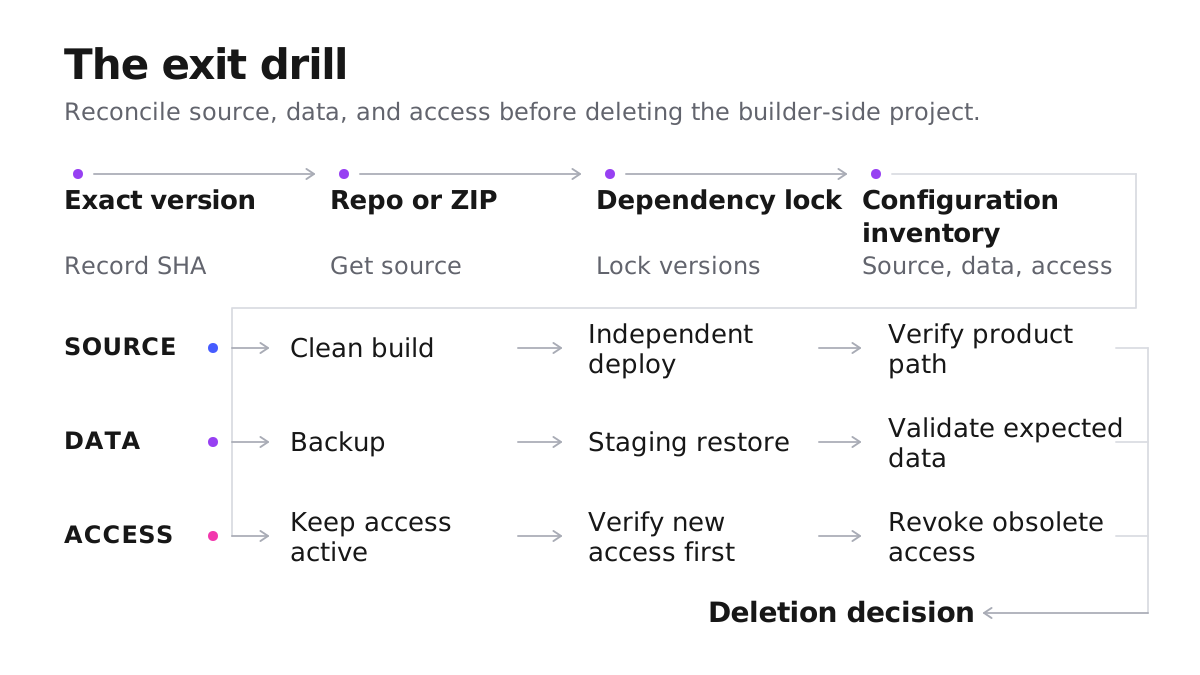
Before deletion, verify the connected repository from outside the Mythos session and export the account JSON. The export should report meta.complete as true before it is treated as a complete account export.
Two GitHub limits still matter at the ending:
- the connected repository begins with a clean snapshot instead of the full internal Mythos history;
- selected-branch synchronization can take time, so visible conflicts or an unsettled status must be resolved before the managed source disappears.
Neither limit changes who owns the generated code, but both change the evidence available after deletion. A repository that survives is valuable only if the intended files reached it. An account export is useful only if it completed. Data remains recoverable only if its separately owned provider and backups are still available.
Account deletion should therefore be the final confirmation of an exit, not the mechanism used to discover whether an exit works. Run the independent continuation test earlier using the GitHub handoff guide. If that test exposes a missing environment name, inaccessible provider, stale branch, absent backup, or undocumented command, there is still time to correct the boundary without pretending that source ownership solved every other form of custody.
Last updated