
SABLE Fashion Blog
Blog website template
Create a fashion blog with SABLE. Nine article pages, colourful story cards, related reading and a newsletter form for your own Supabase database.
by Mythos·0 remixes
Key Highlights
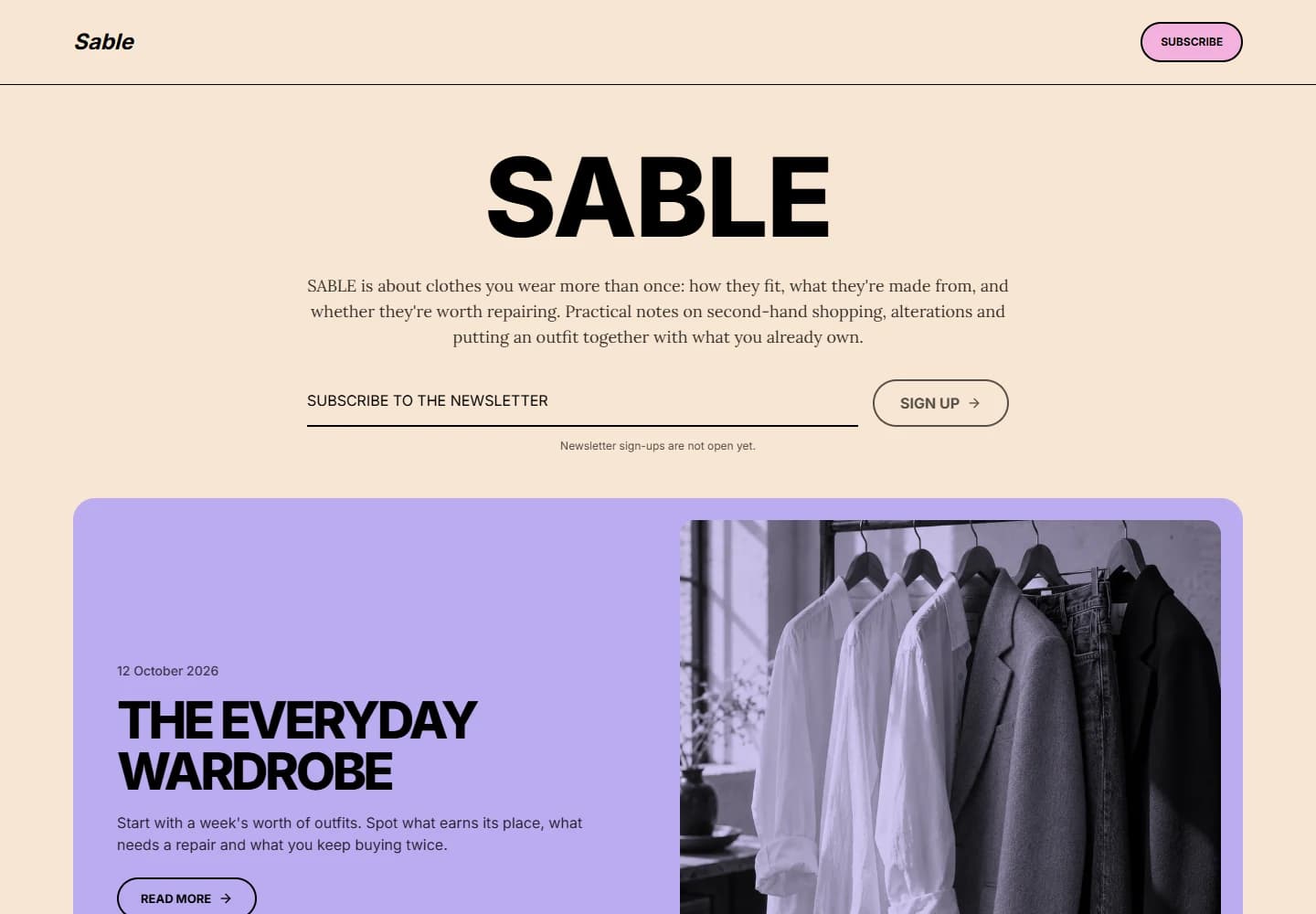
An opening story with room to breathe
A large masthead, personal introduction and featured article establish the journal.
A colourful story collection
Six cards open the archive, with two more available through Load more.
Nine complete reading pages
Articles include an author, date, reading time, cover photograph and related stories.
Layouts for small and large screens
Responsive images and a one-to-three-column grid adapt to the available space.
Newsletter signup with Supabase
Save addresses in your own database. Connect a mailing service for email delivery.
Search metadata for each page
Readable HTML, article structured data and a sitemap configured for your published domain.
Features & Capabilities
Explore the pages, interactions, and starting content included in this template.
About this template
SABLE is a fashion blog template for writing about the clothes people wear and keep. A large masthead and personal introduction lead into a featured story. Colourful rounded cards, tinted photographs and a warm cream background give the homepage its character; article pages give the writing more room.
The sample edition contains nine complete articles about wardrobes, fabric, second-hand shopping, alterations and independent design. The sample author and generated photographs are illustrative. Replace them with your own writing, identity and images.
Best use cases
Personal style blogs. Document what you wear, what you repair and what you learn from living with a smaller wardrobe.
Independent fashion publications. Publish interviews, garment studies and observations with complete reading pages and related stories.
Stylists and vintage shops. Explain fit, fabrics and useful details alongside your work. The journal provides an editorial home; booking, checkout and product inventory can be added when needed.
Features
A homepage built around the stories. One featured article opens the collection, followed by six cards. Load more reveals the final two. The grid moves from three columns to two and one as space narrows, and returning from an article preserves the expanded collection and reading position.
Nine full article pages. Each has its own address, cover photograph, date, author and calculated reading time. Section headings break up longer pieces, and three related stories offer somewhere to read next.
Publication information and social links. About introduces the sample editor and the journal. Privacy provides starting text to adapt to your services. Instagram, X and Pinterest links sit in a separate footer column; replace the network homepages with your own profiles.
Newsletter addresses in your database. Connect Supabase through Mythos and apply the included setup to save validated addresses. Duplicate signups do not add another row, and public readers cannot browse the subscriber list. The form stays closed until configured and reports failed requests without claiming success. Email delivery, confirmation and unsubscribe handling need a mailing service.
Search and sharing metadata. The twelve content pages are rendered as readable HTML, with individual titles, descriptions and social preview images. Articles include structured data. Set your final domain and enable indexing to generate canonical URLs and a sitemap; the demonstration stays non-indexable.
Local WOFF2 fonts, responsive WebP photographs, keyboard navigation and reduced-motion support are included. SABLE uses the Mythos base generation starter with React, TypeScript, Vite and Tailwind CSS.
Getting started
- Explore SABLE. Open an article in Preview, then choose Create your own in Mythos.
- Introduce your publication. Change the name, introduction, editor details and social profiles.
- Prepare the first edition. Replace the sample articles and photographs, choose the featured story and check image descriptions.
- Connect the newsletter. Set up your own database, test a signup and arrange how you will send emails and handle unsubscribes.
- Publish when ready. Review the privacy information, set your public address and read the site on a phone and a larger screen.
Articles are maintained through the website project and Mythos chat. A separate content dashboard is not included. For help planning your first edition, read how to start a fashion blog.
Related Templates
Loading related templates…

